

Hotel Guest Journey Management. Connected to Your Operations
Turn guest preferences, service requests and key moments into coordinated action within Newhotel PMS — helping your team deliver more personal and consistent service throughout the stay.
Knowing your guests is only the beginning. What your team does next makes the difference. Connect what matters to each guest with the people and workflows that shape their stay — from special arrival arrangements to service requests and follow-up.
Plan the moments that matter
Map the guest journey from the reservation onwards. Define the service required at key moments and create workflows around guest profiles, operational segments and individual needs.
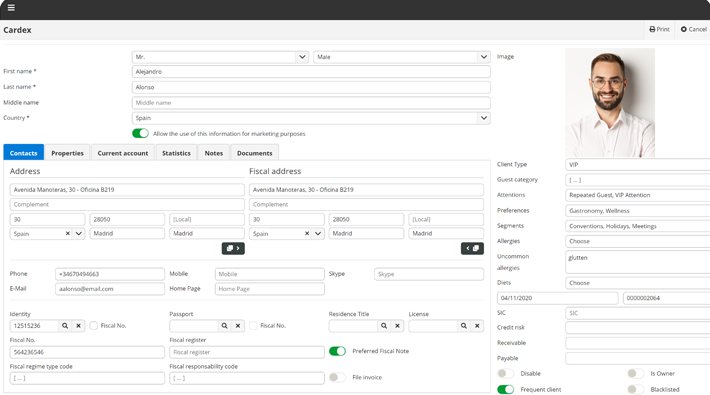
Give personal service a stronger foundation
Bring together the details your team needs to prepare and deliver service with greater care.
- Preferences and special requirements
- Allergies and relevant guest information
- Multiple operational segments per guest or reservation
- Loyalty cards associated with the guest profile
- Guest interactions and follow-ups
Use operational segments to identify different service needs and guide the appropriate workflow for each guest.

Turn key moments into clear actions
Create operational workflows automatically through predefined rules and guest segments, or manually when a situation requires individual attention.
- Trigger workflows around key guest moments
- Assign actions to departments or individual staff members
- Define response times for incidents and workflow moments
- Register manual follow-ups
- Connect workflows across Newhotel PMS and other Newhotel touchpoints
Define the service. Assign responsibility. Plan the follow-up.
All teams know what needs to happen next
A guest’s experience often depends on several departments. Guest Journey brings actions, incidents and follow-ups together within the PMS, helping teams work from shared information and coordinate their response.
Shared context
Give teams access to the guest information relevant to the service.
Clear responsibility
Identify the department or staff member responsible for each action.
Defined response times
Set expectations for incidents and key moments in the workflow.
Better coordination behind the scenes. A smoother experience for the guest.
Every request. One screen. A clear next step
Manage guest service requests in real time from one screen. Native to Newhotel Cloud Suite and connected to POS, Spa and the Guest Experience app, Service Monitor helps your team coordinate service from the initial request to follow-up.
Process, cancel or track requests, post charges directly to the guest’s account and let guests submit or decline requests through the app.
- View and manage service requests in real time
- Keep requests connected to the guest and relevant service information
- Identify the department or staff member responsible
- Post service charges directly to the guest’s account
- Turn defined service issues into incidents and notify the assigned team
When a request needs more attention.
For example, if a room service request is rejected three times, an incident opens automatically and the designated team is notified, helping the hotel identify and respond to a recurring service issue.
Give your team a shared view of guest requests, with clear responsibility and less time spent searching individual reservations for updates.


Turn a service issue into an opportunity to respond
The Incidents panel brings together interactions, actions, complaints and follow-ups associated with each guest or reservation.
Listen. Take responsibility. Follow through.
The questions we always get
What is Guest Journey in Newhotel PMS?
A module within Newhotel PMS that connects guest information with operational workflows, helping hotel teams coordinate key moments, incidents and follow-ups.
Can we create different journeys for different guests?
Yes. Multiple operational segments can be associated with each guest or booking to reflect different service needs and trigger appropriate workflows.
Can workflows be automated?
Yes. Workflows can be generated according to predefined rules and operational segments, or created manually.
Can we assign actions to departments or staff?
Yes. Incidents identify the department and/or staff member responsible for follow-up. Response times can be defined for incidents and key workflow moments.
How does Guest Journey connect with other Newhotel solutions?
Workflows can originate from PMS reservations, Service Monitor, Concierge, POS Booking Table, Spa and the Guest Experience app.
How does it help teams act on guest feedback?
Courtesy calls record guest ratings. Ratings below four stars automatically open a follow-up to review the stay, with information about the staff member who called and followed up.
Turn guest knowledge into better service
See how Guest Journey gives your team the context, workflows and visibility to personalise service within Newhotel PMS.
Request a demoBuild your solution